發表文章

VC++ install, vcpkg

圖片
English installer "C:\Program Files (x86)\Microsoft Visual Studio\Installer\vs_installer.exe" --locale=english https://github.com/Microsoft/vcpkg 更新 vcpkg remove --outdated vcpkg install <list of libraries you want available by default> See .\vcpkg help triplet for all supported targets. 只build release,可在triplet內加入 set(VCPKG_BUILD_TYPE release) 加compiler flag build lib時 VCPKG_C_FLAGS VCPKG_CXX_FLAGS https://github.com/Microsoft/vcpkg/issues/3106 安裝可加參數 cmake -E env CFLAGS="-MP -Oi -arch:AVX2"  CXXFLAGS="-MP -Oi -arch:AVX2" cmake 使用lib方法 https://github.com/Microsoft/vcpkg/blob/master/docs/users/integration.md cmake .. -DCMAKE_TOOLCHAIN_FILE=.../vcpkg.cmake -DVCPKG_TARGET_TRIPLET=x86-windows-static https://github.com/kvirc/KVIrc/issues/2400#issuecomment-421496054 https://blogs.msdn.microsoft.com/vcblog/2016/11/01/vcpkg-updates-static-linking-is-now-available/ triplet的customization https://github.com/Microsoft/vcpk...

Windows 系統/程式相關

圖片
 MAX_PATH 260字的限制可以解除 https://docs.python.org/3.6/using/windows.html#max-path

Android 的影片硬體解碼支援, hardware decoder

來源 http://www.droidviews.com/enjoy-hevc-h-265-video-playback-on-android/ https://play.google.com/store/apps/details?id=net.tyniw.mediacodecinfo.application 使用這套app可以看到系統內的encoder/decoder OMX. 後面就是提供者的id,要看你手機的晶片是哪家的 On the Codec List Tab of Media Codec Info App, check for the following:     OMX.qualcomm.hevc.decoder on Qualcomm chipsets     OMX.MEDIATEK.HEVC.DECODER on Mediatek chip-sets     OMX.Exynos.hevc.dec on Exynos chip-sets

ghacks 文章記錄

https://www.ghacks.net/2018/02/08/find-out-why-you-cant-access-a-website-or-service-on-the-internet/

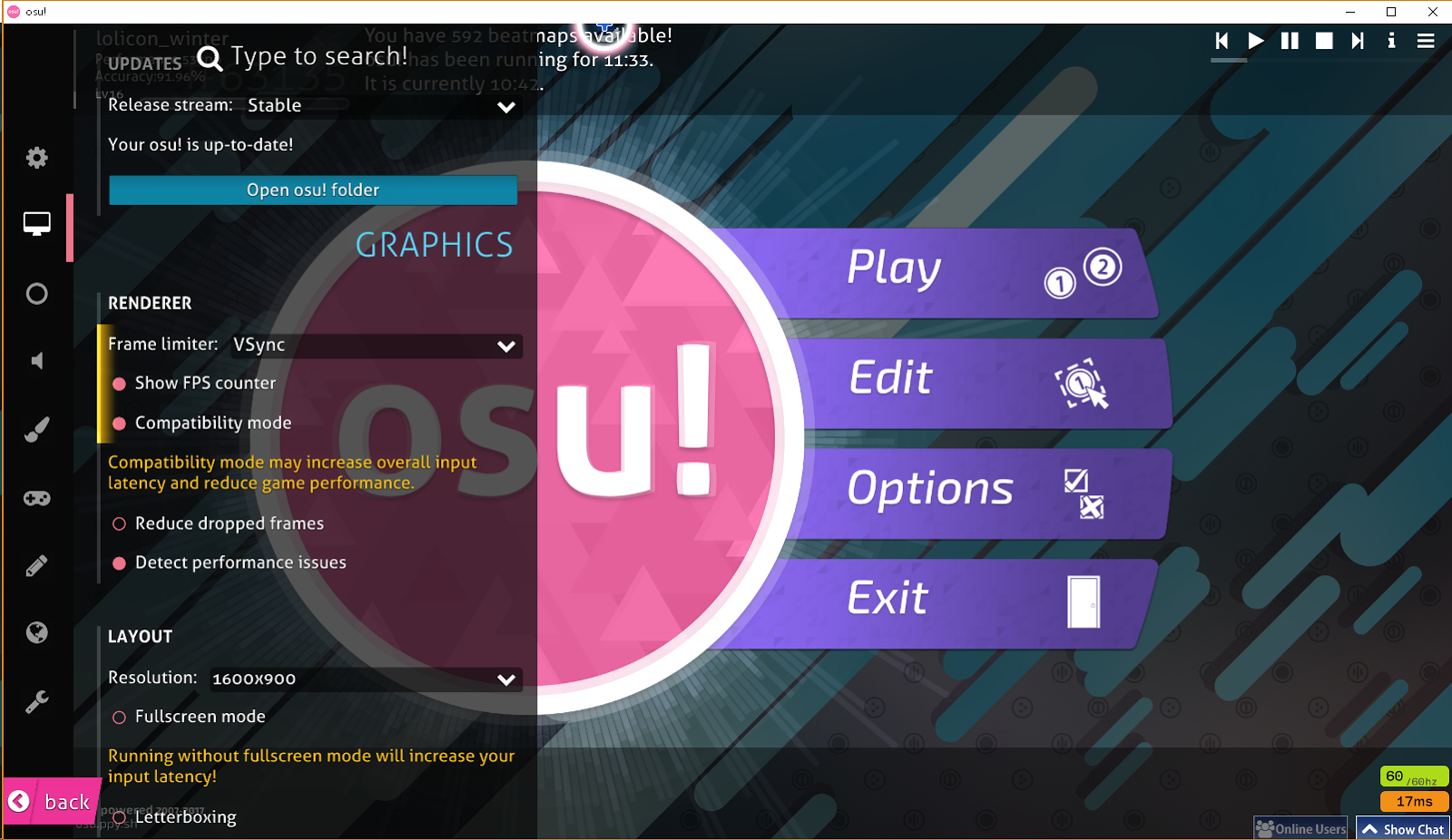
osu! 設定 畫面不順 FPS低,實況無畫面, compatibility mode, obs crash

圖片
最根本的原因是螢幕刷新速度不夠,買個144的螢幕吧 如果螢幕沒問題,該注意設定 測試新設定,把FPS上限調成螢幕兩倍(120)中,不用VSync 改120 FPS好像有比vsync好打(畫面更新較快,比較多時間可以反應),雖然tearing會出現 osu!似乎有個bug? 也許是我顯卡driver的問題? 開VSync下,沒開compatibility mode (會用opengl跑) FPS會只跑30/60,怪不得我玩的時候都覺得畫面不順 總之打開FPS顯示確認一下右下角寫多少吧 解法是打開 compatibility mode 或是FPS限制不要用VSync 如果FPS夠,還是不順(感覺畫面不連續) 可以把 Reduce dropped frames 打開看看 上面各選項組合測試出最適合自己的設定吧 我視窗下遊戲的設定是 1600X900,fullscreen mode沒開 V-sync +  Reduce dropped frames  (測試結果比 60FPS + Reduce dropped frames好) 改設定檔 osu!.[username].cfg 設定FPS,就會多一個選項60FPS可以選 username是你系統使用者帳號的名字 CustomFrameLimit = 60 如果你的螢幕更好,可以改到更高 (最大調到螢幕限制),60打osu是稍微不夠用的 為啥不提供在遊戲中輸入FPS的介面呢? compatibility mode沒開是用opengl跑 (opengl和obs相容性可能有問題) 打開會切換成DirectX OBS會當掉的也可以考慮嘗試切換DirectX看看 換成 compatibility mode 後,FPS數值可跑到60/60 實際體驗也有比較順,有問題的人可以調整一下 有人些會搞不清楚osu!到底是用哪種模式運行 建議使用game capture時,視窗和全螢幕的選項都試試看 我會打開這個選項 (我多數是日文ACG的圖,可以換日文顯示)

github delete remote branch/tag

https://help.github.com/articles/pushing-to-a-remote/ delete remote branch git push <REMOTENAME> : <BRANCHNAME>   However, here, you're telling Git to push nothing into BRANCHNAME on REMOTENAME . Because of this, git push deletes the branch on the remote repository.        delete remote tag https://stackoverflow.com/questions/5480258/how-to-delete-a-git-remote-tag github的tag一定是 create time,無法push過去的tag

github co-authors

https://help.github.com/articles/creating-a-commit-with-multiple-authors/ commit message中空兩行 Co-authored-by: Joel Califa <602352+califa@users.noreply.github.com> Co-authored-by: Matt Clark <44023+mclark@users.noreply.github.com>

無失真數位音樂比實體DVD光碟還要好, loseless digital music is better than DVD audio disk

蘿莉控丹談到他買了很多DVD音樂,好奇之下我去查詢DVD音樂的格式,才發現這件事 DVD上保存的音樂格式是 CDDA(CD-DA) https://en.wikipedia.org/wiki/Compact_Disc_Digital_Audio 這是以前CD音樂時用的格式 (1980發明,現行版本1992年的) The audio contained in a CD-DA consists of two-channel signed 16- bit Linear PCM sampled at 44,100 Hz . 對現在的設備過時了,可以使用更好的音質 大概又是商業因素,搞不定標準吧 (曾經出現過的規格都消失了),就一直沿用了 如果沒對實體片子有堅持的話,建議買無失真數位音樂格式 (FLAC, ALAC...etc) 保存上方便,不用單子片子損壞,品質又比較高 隨便google的某個音樂使用 96kHz/24bit Sample Rate 96k/44.1k = 2.17687074829932 倍 24bit表示聲音的精準度會比16bit高 如果把片子轉成數位檔,要注意不要把音質設定條超過CDDA規格,只是浪費空間而已 也許程式比較聰明會自動判斷來源品質,根本不用操心? 在意音質的話,可轉無失真格式 (品質和從光碟聽相同),和轉成wav檔同音質但容量較小

OBS使用案例 聽自己的歌+開放點歌, don't output audio to stream

某蘿莉控丹問我的問題 想要某些聲音不被OBS抓到,必須要有至少兩個聲音輸出裝置 (OBS和其他程式用不同的) 如果沒有實體裝置的情況下,可以用軟體虛擬 比較有名的是 Virtual Audio Cable (要錢) 可以用 Virtual Audio Cable alternative 去google找其他方案 (有免費的) 如果程式無法指定輸出裝置的情況,可以用其他程式把輸出重新導向 Audio Router https://github.com/audiorouterdev/audio-router 資料來源 https://superuser.com/a/1183002/861086 不想裝軟體,在程式啟動前就調整預設輸出裝置再啟動程式 如果程式只會抓一次輸出裝置的情況下 藉此可達到不同程式不同輸出也是有可能辦到的 (很麻煩,不一定有效) 如果是只想放給觀眾,可以在系統音量把程式的聲音關掉 (不是軟體內) 這樣做OBS還是會抓到聲音 (可以看OBS音量條確認)

Qt debug

CDE install from windows sdk (no option in visualstudio2017 installer, 2018/1/23) https://developercommunity.visualstudio.com/content/problem/127056/cdb-in-visual-studio-build-tools.html https://docs.microsoft.com/en-us/windows-hardware/drivers/debugger/ Qt defines QT_NO_DEBUG for release builds. Otherwise QT_DEBUG is defined.

How to get Twitter gif source?

圖片
Someone asks me how to get Twitter gif source. Take this for example https://twitter.com/paint002/status/916984184035360768 I use Firefox, press F12 to open tools below web page. 1. click there to start picking an element 2. click on gif to pick it 3. find source in src attribute (It is a .mp4 video in this example) Another method install this userscript, you can open original pictures (not embedded in web page) https://greasyfork.org/en/scripts/15271-extract-images-for-twitter

瀏覽器的選擇 Firefox or Chrome?

圖片
My preference: Firefox > Edge > Chrome Chrome is faster but consumes more memory. (1+ process per tab) Firefox concerns your privacy, Chrome wants your privacy for advertising. https://www.mozilla.org/en-US/firefox/all/#product-desktop-release Firefox is a bit slower than chrome but less memory usage. Chrome creates one process for every tab. Every extension uses more memory in Chrome than Firefox. https://craftwarblog.blogspot.com/2017/11/firefoxchrome-extension-youtube.html uses 23xxK in Chrome, 4xxK in Firefox. Firefox Quantum (Firefox 57 later) is getting faster and better responsive. Firefox is closing the gap to Chrome speed. You should try it if you don't have enough memory. You should use Firefox if you are lolicon.

Don't use WinCDEmu anymore

sysprogs doesn't maintain it any more. Program can't be built from source. Program doesn't work in some image format. (mds) And this issue https://github.com/sysprogs/WinCDEmu/issues/16 maybe use this? ImDisk (open source solution) http://www.ltr-data.se/opencode.html/#ImDisk

windows 升級的注意事項, win10

如果你想要把舊系統的程式保留使用,必須選擇升級系統,選安裝新系統必須重裝 我會選擇安裝成新系統,比較乾淨不會有問題 為了簡化/避免重新安裝程式,可以做的事 備份registry (HKCU/HKLM), %userprofile% , 其他資料 裝完系統後再依程式取出備份中相應的部分 安裝完後,因為新系統的使用者帳號SID和舊系統的不同 權限上會有問題,需要修正,把新系統以外檔案系統的擁有者都拿回來就好了 https://support.microsoft.com/en-us/help/4043454/windows-10-windows-server-update-history

Javascript test sites

code snippets benchmark https://jsperf.com/

OBS: capture Twitch chat from Chatty 擷取Chatty聊天室文字

圖片
If you don't use Chatty, you should use browser source to render Twitch chat. (Sine OBS Studio add hardware acceleration to browser source) If you have mutiple monitor or enough space. You can try streamchat function in Chatty. (no example now) First Add a window capture to Chatty. No picture this step, I think you have no problem here. Click Filters to add filter to Chatty window capture.   Add "Color Key", set Key Color to Chatty background color. (black #000000 in my case) Adjust Opacity to see what's changed and pick one value.   Edit Transform(Ctrl+E) to crop Chatty  window capture. (capture part of Chatty window) I can't tell you which size is better. Just try and see what's changed.

Sandboxie

https://www.sandboxie.com/ API level virtualization, less cost than virtual machine. recommend use this to run programs you don't trust. (ex: most China software)

找出 Windows 熱鍵被誰用掉, who uses my hotkey

https://superuser.com/a/1204019/861086 spy++ 原來還能這樣用 C:\Program Files (x86)\Microsoft Visual Studio\2017\Community\Common7\Tools\spyxx_amd64.exe

OBS development note

圖片
Jim說他想保持OBS簡單一點,不希望一堆niche被加入,這樣會讓其他人後續維護量增加 所以我改的冷門功能,官方也不會採用 API https://obsproject.com/docs/index.html Contributing https://github.com/jp9000/obs-studio/blob/master/CONTRIBUTING.rst Translation https://obsproject.com/forum/threads/how-to-contribute-translations-for-obs.16327/ scripting use the same api as C/C++ (python, lua) C++17會讓amd-amf error,要開的話這個plugin要拔掉 (19/2/12) 加密client_id的原因,youtube要求保密 基本上這種加密也沒啥用,因為有source code,而且OBS又有pdb deobfuscate_str() 給twitchclient_id (去twitch註冊,url放OBS內寫的) hash是uint_64 source plugin create new source的時候 get_properties is called before update other notes obs-text scene沒切到還是一直在跑,設定file或抓歌的情況,就會一直在背景scan 要研究才知道是obs設計,還是plugin原本沒寫好 沒在用就把file/song都不勾吧 參考window-capture.c的tick,修完了w 不是active scene的情況,直接return (只有修正我改的版本,官方版沒有) create內constructor會直接call obs_source_update,會去跑Update Update內的東西大多不需要先放在new_內,都直接再assign給沒new_版本的變數 windows file lastwrite time的精準度相關問題 (只有寫入disk才更新) https://github.com/obsproject/obs-studi...

目前玩出的VS2017 15.5 bug

圖片
中文在utf-8 encoding,VS2017還是叫我轉編碼不然會損失資料 從M$人員的留言得知,M$也會偷修bug,小bug修正就不列,只列大的 所以評價M$產品比OpenSource少bug,是一點也不可靠 .c檔改成compile成C++也是不能用C++的功能